Skip to content

Product

One project,from idea to production.

Projects own everything: evidence, concepts, evaluations, experiments, the brand kit, the screens, and the app. Each stage reads what the last one made, and sharing or transferring a project moves the whole record.

The path

Three phases.Each one feeds the next.

Evidence picks the idea, the research shapes the brand and the screens, and the agent builds against those screens. Nothing starts from zero.

  1. 01

    Discover and decideFind the idea worth building

    Capabilities, cited evidence, concept genomes, two independent evaluators, hard gates, and experiments on the riskiest assumption.

    Leaves: A concept with its case attached

  2. 02

    Brand and designShape it from the research

    A screened name, a vector logo, an accessible palette, and the app’s screens, planned from the research and designed in the brand.

    Leaves: A brand kit and confirmed screens

  3. 03

    Build and shipThen build it

    An AI agent builds the real app in a live sandbox against the design package, with every request priced and every version kept.

    Leaves: Running code you own

01Explore

ExploreWhere the research begins

Select capabilities from the atlas, pin what matters, and run opportunity discovery. Research runs plan their own queries, fetch sources through an SSRF-safe fetcher, and extract claims with locators.

  • A capability graph with freshness and availability
  • Opportunity candidates to pin or exclude
  • Live run progress, resumable after a failure
02Concepts

ConceptsIdeas, given structure

Every concept is a genome: target user, job, trigger, core loop, mechanism, wedge, business model, distribution, feasibility, privacy, and assumptions. Fork variants, record decisions, and compare up to six side by side.

  • Duplicate detection by a judge model
  • Decision history beside the AI recommendation made at the time
  • Card, table, and board views across shortlist, validate, build, and hold

03Evaluation

EvaluationTwo opinions, one reproducible number

OpenAI and Anthropic evaluators score each criterion independently, with a rationale and cited claims. Application code computes the weighted score, confidence, disagreement, evidence coverage, and hard gates.

  • Per-criterion decomposition with both rationales
  • Per-project scorecards with weights and gates
  • Re-evaluate any version without rewriting history

04Validation

ValidationWhat must be true, and how to find out

Assumptions are ranked by importance × uncertainty × cost of being wrong. Each experiment defines its method, success criteria, kill criteria, and timeline. Structured outcomes trigger re-evaluation.

  • Genome, AI, and manual assumptions in one ranked list
  • A board for planned, running, complete, and abandoned work
  • Learnings carry forward; history stays intact

05Artifacts

ArtifactsDocuments that remember their sources

Validation briefs, PRDs, and a 26-section implementation spec, generated section by section from stored state. Validators run before export, every citation resolves to a Sources file, and the spec travels to the Builder with the brand kit and screens.

  • Section navigator, Markdown preview, and provenance panel
  • ZIP export with expiring, authenticated downloads
  • Regenerate a single section as a new revision

06Studios

StudiosA brand and screens from the research

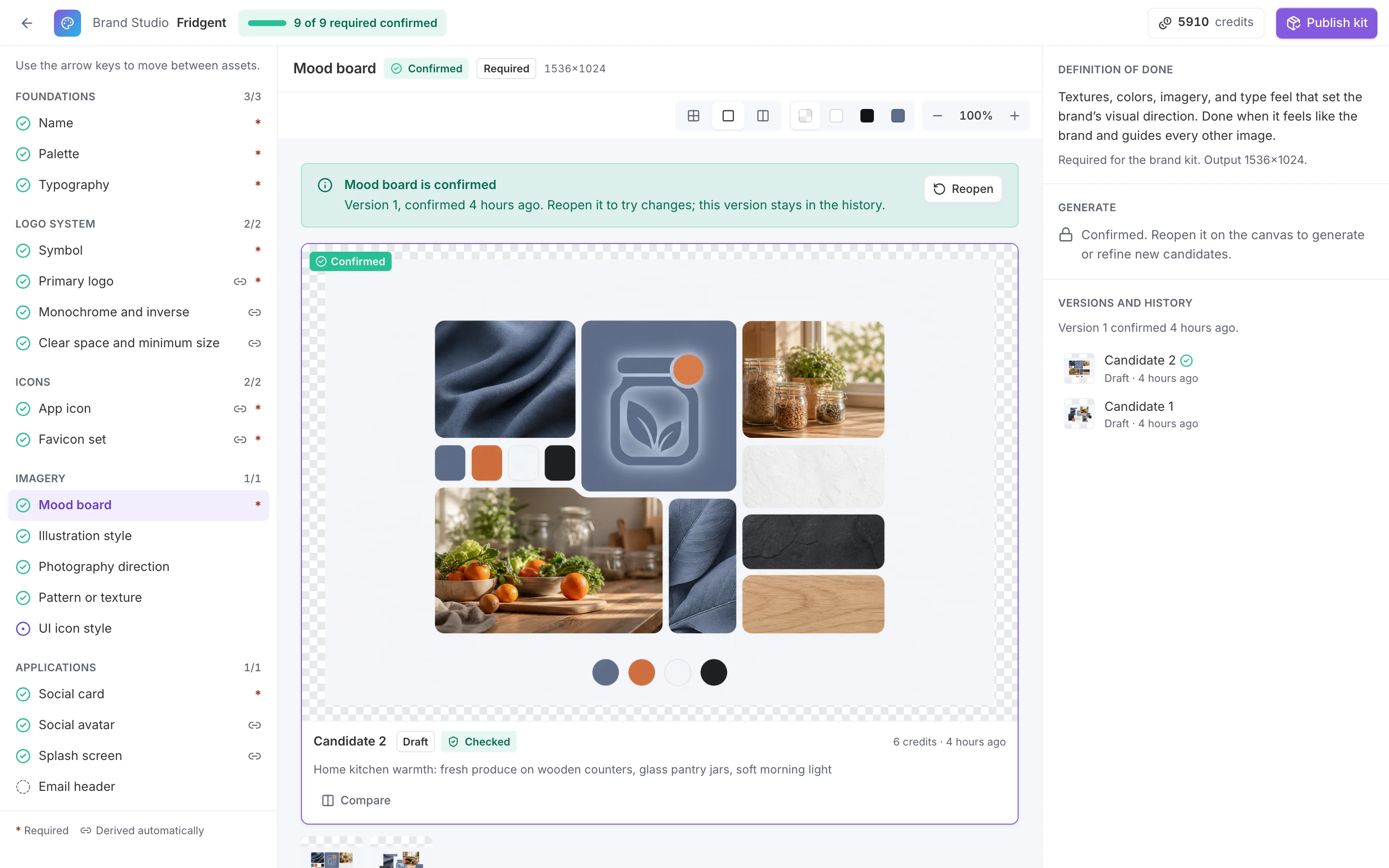
Brand Studio screens names, builds a palette that passes WCAG AA, pairs type, and traces a GPT Image 2 logo symbol to SVG, then draws every derived asset in code. Mockup Studio plans the app’s flows and designs each screen per device in that brand.

  • Names pre-screened for language, trademarks, domains, and handles
  • An immutable brand kit with DESIGN.md guidelines
  • Confirmed screens with editable specs and a prototype link
Brand Studio for the sample brand Fridgent with all nine required assets confirmed. The left rail lists the kit by group: name, palette, typography, logo system, icons, imagery, and applications. The canvas shows the confirmed mood board of pantry jars, fresh produce, and slate and oak textures with the brand colors.
Sample project · made in LiteSurface

07Builder

BuilderThe agent builds the real app

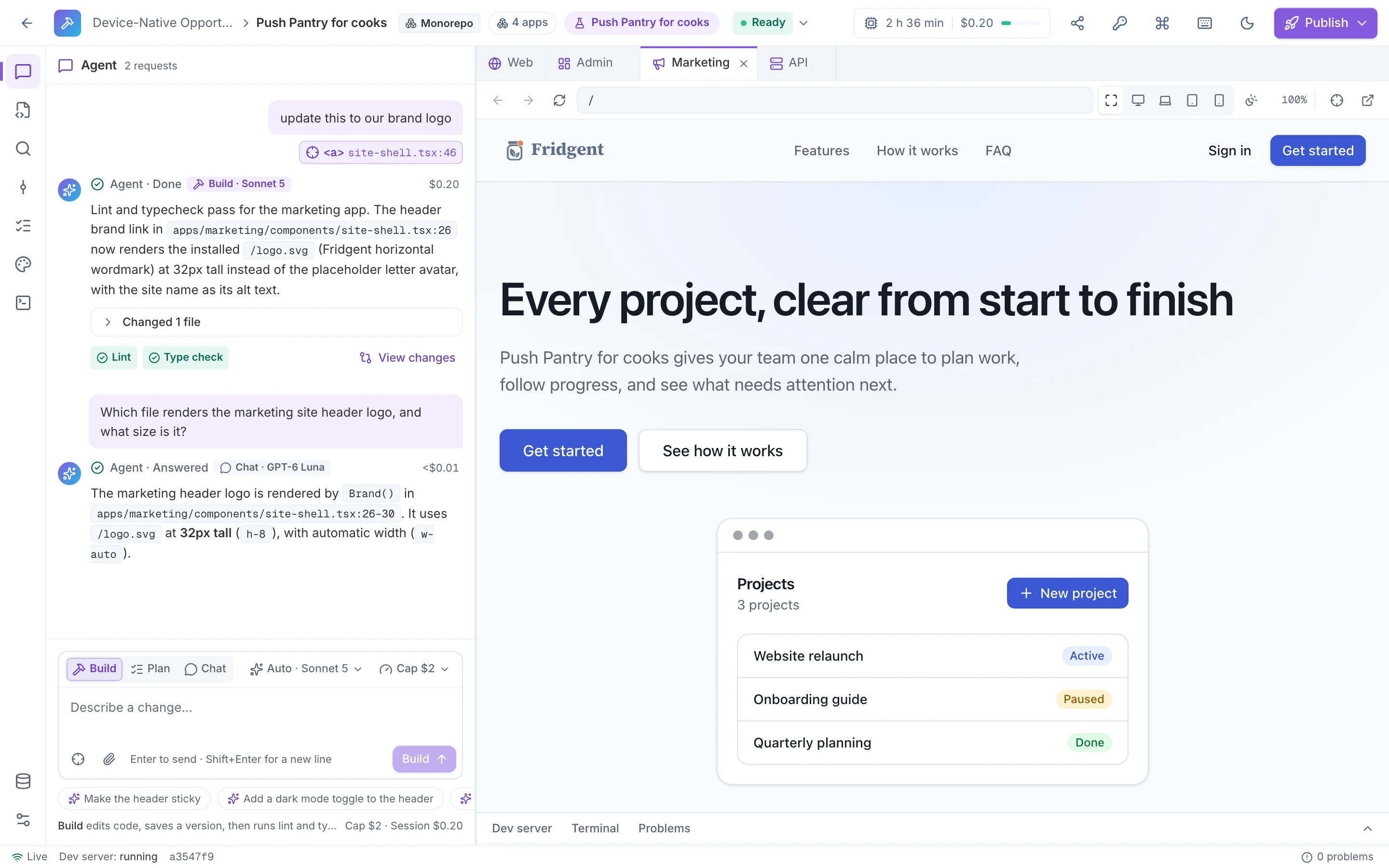
A live sandbox per app with an AI agent in Build, Plan, or Chat mode. It imports the design package, edits and checks the code, and updates the preview while you watch, with the cost of every request shown and capped.

  • Next.js, Vite + React, Astro, or a full-stack monorepo
  • Claude and GPT-6 models at list price, with a spend cap per request
  • Versions with diffs, then a pull request, a ZIP, or a live preview
The Builder for a four-app monorepo, session ready. The agent chat shows a request to use the brand logo with an element attached from the preview, answered by Build with Sonnet 5 for $0.20 with lint and type check passed. The live preview has Web, Admin, Marketing, and API tabs, with the Fridgent marketing site open.
Sample project · made in LiteSurface

08Admin console

Admin consoleRun it like infrastructure

A separate app for owners and admins: provider health and circuit breakers, versioned prompts with rollback, background jobs with retry, usage and budgets, and a complete audit trail.

  • Monthly soft and hard budgets; hard limits refuse new runs
  • Workspace prompt overrides, recorded on every invocation
  • A deterministic eval suite as the release gate

Your data

You decide what a model sees.Everything else stays put.

Strategy profiles, capability descriptions, evidence excerpts, and concept genomes go only to the providers a workspace admin allows, after an explicit disclosure. Fields marked sensitive are stripped before a prompt is assembled. Each invocation records provider, model, tokens, and cost; raw prompts and documents are never logged.

Read the privacy details
  • Admin allowlist and disclosure

    Project content reaches only the providers a workspace admin allows, after accepting an explicit disclosure.

  • Sensitive fields stripped

    Fields marked sensitive are removed before a prompt is assembled, so no model ever sees them.

  • Metadata logged, content not

    Every invocation records provider, model, tokens, and cost. Raw prompts and documents are never logged.

What project data is sent to each AI provider
DataOpenAIAnthropic
Strategy profilesPlatforms, horizon, tolerances, and posture that steer generation and the gates.If allowedIf allowed
Capability descriptionsThe atlas entries you select for exploration.If allowedIf allowed
Evidence excerptsClaims and passages extracted from stored sources, treated as untrusted data.If allowedIf allowed
Concept genomesStructured concepts sent for generation, critique, and evaluation.If allowedIf allowed
Fields marked sensitive, model allowedSent only to the providers the workspace allows.If allowedIf allowed
Fields marked sensitive, no modelStripped before prompt assembly.NeverNever

“If allowed” means a workspace admin has enabled the provider after reviewing the disclosure. Workspaces can use their own provider keys, and raw prompts and documents are never written to LiteSurface logs.

Get started

See it end to end,before you run your own.

Explore a sample project before you run your own, then take your idea from evidence to a brand, screens, and a running app.